csxq0605/Nexgent
Nexgent: A Desktop Agent Team That Learns
A desktop agent that works in your project folder, organizes its own team, and remembers what worked.
Overview
A general-purpose desktop agent (TypeScript monorepo; Electron desktop app and CLI over one in-process SDK) that works in the user’s project folder. Each project has a coordinator that only splits, dispatches, relays corrections, and summarizes; threads work in their own copies of the project and, when a piece is large, use an organize tool to assign one to six members with generic roles. After each team run it records the cost, time, failures, and wasted work of every part, changes only the hottest spot, and keeps or reverts that change on the next similar task while keeping a solo control group; experience notes are enabled or disabled by randomized with/without comparisons, and outcomes count only deterministic checks, user corrections, and external review. Mid-run user messages take effect on the next model request, the user’s own words survive context compaction verbatim, and an append-only JSONL session log with a usage ledger allows recovery after a hard kill, with OS-level sandboxing, approvals, and three-level cost limits.
README
Copied from csxq0605/Nexgent at 80d76b6 on 2026-11-09.

One project. A team that learns.
A desktop agent that works in your project folder, organizes its own team, and remembers what worked.
Philosophy
Improvement should happen inside the work you are already doing, not in an offline lab.
You open a project folder and say what you want in plain words. A coordinator splits the work and hands each part to a thread, a background conversation that works in its own copy of the project and organizes its own members when its part is large. You can keep talking while it works. You can also name the threads you want, or start one yourself. How threads work together is tried one change at a time against the collaboration problems Nexgent records, and a change stays only when those problems stop.
One project. A team that learns.
Design principles
-
The user’s words come first
You can interrupt at any time; the next model request takes your message, and running members and members that start next get it too. Compaction keeps every word you said verbatim, so rules set at the start survive a long task. Project rules you state (“from now on…”) are given on every task. -
The agent organizes the work
Each project has one coordinator conversation. It does not edit files or run commands: it splits the task, hands every part to a thread, follows up, passes your corrections on and sums up. When you name the threads, it starts exactly those and passes your words to each. A thread works in the background in its own copy of the project; a small part it does and checks itself, a large one it splits into 1–6 members (plan, explore, implement, test, review) with oneorganizetool. Finished work merges back into the project; when several threads merged files, a whole-project check runs once they have all ended. It keeps project notes (goals, standing rules, decisions, pitfalls) and briefs each thread with its goal, inputs and limits. -
It improves how threads work together, quietly
When a task’s threads have all ended, the host counts the collaboration problems between them: files two threads both changed, merge conflicts, files a handoff missed, files outside a thread’s part. When a problem keeps coming back, it tries one collaboration variable at a time (threads that change the same files run one after another; every thread is told at once which files the others brought in; a message wakes an idle thread; a thread that did none of the work does the final whole-project check), enforced by the host, and keeps it only after the problem stays away for several tasks in a row; a worse result, 1.5× the cost or twice the time reverts it. You see one line about what is being tried; there are no settings for it. Threads share a collaboration log kept in the project (.nexgent/collab/, never committed); new entries that concern a thread reach it before its next step, even in the middle of a long turn. Every message between threads is passed to the coordinator and shown in both threads’ windows. Whether threads also write claims and handoffs to the log themselves is your choice in the settings. -
Project memory, with evidence; you decide
The Project memory page keeps rules, practices and project notes in one place, each with where it came from and when; you can add, edit and delete them. When you correct the work or say how it should be done from now on, the conversation offers a “Remember this?” card with your own words. After each task the host counts, from the run records, the corrections you made, the files that caused trouble, how the split went and calls that kept failing. When something keeps coming back (you saying the same thing in several tasks, a file that causes trouble again and again, splits that go wrong) a “Project observations” card shows it with the tasks, your words and the files as evidence, and offers one action: keep it as a rule, ask the coordinator for split advice, or ignore it. Entries whose files are gone are marked as possibly outdated. Nothing changes until you choose. -
Generic, never task-specific
No rule, prompt or default exists to make one kind of task pass. Example tasks are only used to measure. -
Recoverable and safe
Sessions are append-only logs: stop, rewind file changes, or kill the process and resume. Commands run in an OS sandbox; writes outside the project need approval; spending has caps in dollars.
Full positioning: docs/PROJECT_POSITIONING.md and AGENTS.md.
System shape
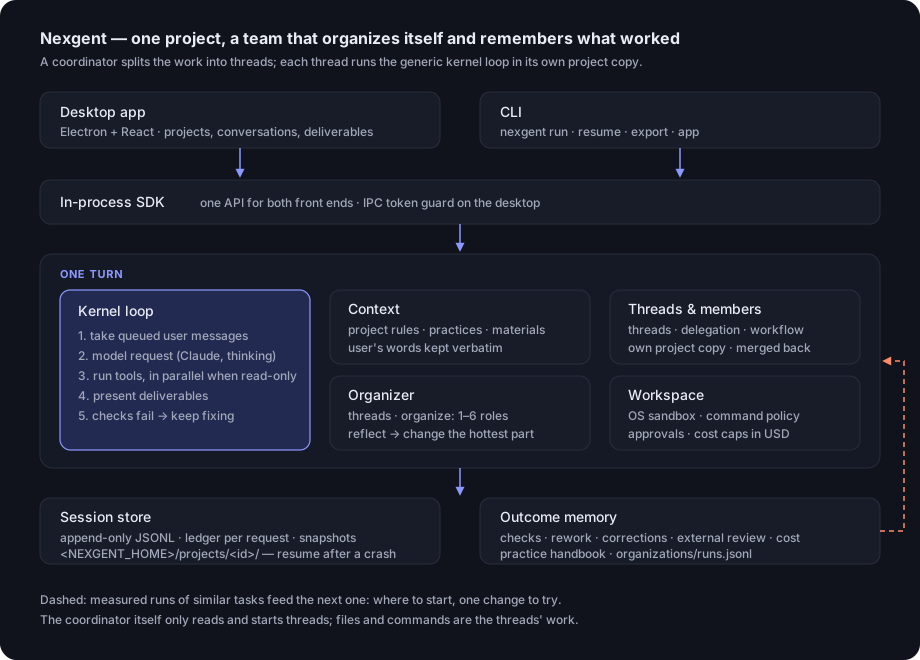
Desktop app (Electron + React)        CLI
              │                        │
              └──────── In-process SDK ┘
                          │
                          ▼
   Coordinator (project chat): split · start threads · relay · sum up
                          │
                          ▼
   Threads, each in its own project copy, merged back after each turn
                          │
                          ▼
   Kernel loop: queued user messages → model → tools → present → checks
        │                 │                      │
     Context          Organizer               Workspace
 rules · notes ·     solo / organize      OS sandbox · approvals
 practices ·         members: delegate      cost caps
 user's words        · workflow
                          │
                          ▼
   Session store (JSONL, ledger, snapshots)   Outcome memory
                          (organization library and collaboration trials, practice handbook)
                          │
                          └──── feeds the next turn
What is in this repository
| Path | Contents |
|---|---|
apps/desktop/ |
Electron main process and React interface |
apps/cli/ |
The nexgent command |
packages/kernel/ |
Turn loop, tools, contracts (field names live in src/contracts/) |
packages/llm/ |
Claude Platform route (Anthropic Messages API) |
packages/session/ |
Session log, ledger, resume |
packages/workspace/ |
Working directory, OS sandbox, command policy |
packages/context/ |
Context, material references, compaction |
packages/tasking/ |
Materials, deliverables, feedback, goals |
packages/subagent/, workflow/, ptc/ |
Delegation, organize, workflows and the organization profile, code execution |
packages/capabilities/, evolve/ |
Practice handbook, project rules and memory, organization library and collaboration trials, outcome review, capability versions |
packages/sdk/ |
In-process API shared by the desktop app and the CLI; project observations |
packages/skill/, preset/, tool-spreadsheet/, web/ |
Skills, presets, spreadsheet and web tools |
packages/test-support/, scripts/ |
Scripted model, acceptance and measurement scripts |
reference/deepseek-harness/ |
Read-only reference (submodule, not built) |
docs/ |
Positioning, operation, configuration, specs (index) |
What it can do
- Projects, conversations, materials, deliverables — materials are copies; deliverables are versioned with diffs and per-version feedback
- Interrupt while it works — messages reach the model and running members on the next step, and members that start next
- A coordinator per project — pinned on top as the default entry; it splits work, follows threads and sums up
- Threads — background conversations with a card each (running / done / waiting for you / waiting for approval); open one to watch it or talk to it; finished ones fold away
- Teams inside a thread — only when its part is large; roles, parallel members, reorganize when stuck
- You name the threads — list them with your message (the button beside the composer) or with
--threadon the command line, or start one from the sidebar or withnexgent thread start; the coordinator follows up on yours - Running limit and stop — threads beyond the number allowed to run at once (3 by default,
threads.maxRunningin the project’sconfig.json) wait in a queue; a running or queued thread can be stopped from its card or its own window - Threads that work together — a collaboration log in the project: which files each thread merged (with lines added and removed), messages between threads and (optionally) claims and handoffs, delivered before each step and shown as one line in both threads’ windows and the coordinator’s; a thread can read a file as the project has it now; questions to the coordinator mid-turn
- Improves how threads work together — tries one change at a time against recorded collaboration problems, enforced by the host; one line under your message says what is being tried and how it ended
- Remembers good organizations — per task class, compared against control runs
- Project memory — rules, practices and project notes on one page, each with its source and date; add, edit, delete and restore; entries whose files are gone are marked possibly outdated
- Remember this? — when you correct the work, a card with your own words offers to keep it as a project rule
- Project observations — at the end of a task, recurring corrections, trouble files, split problems and repeated failures, with the evidence, and one action each
- Project rules and practices — rules on every task, asks when a rule conflicts with existing tests or code; practices kept or retired by randomized give/withhold
- Checks itself — tests, your check commands, deliverables that must open; fixes within the same turn
- Stop, rewind, resume — every conversation, each thread included, has a stop button; stopping a thread stops the members it started; plus approvals, sandboxing and cost caps

The coordinator split one request into four threads: one done, one running, one waiting for an answer, one queued. What the threads said to each other and what they merged shows as one line each.
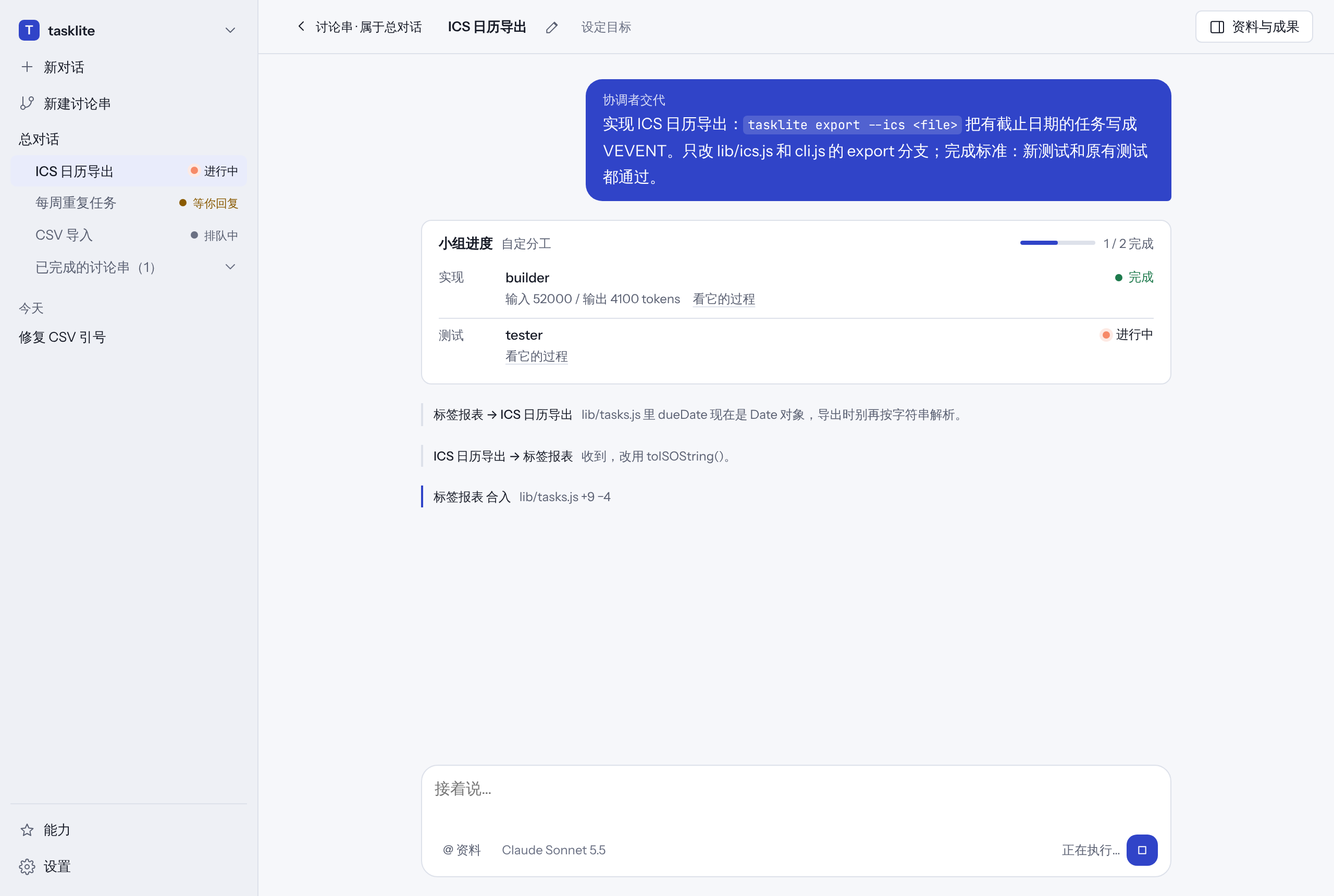
Inside a thread: two members, a builder and then a tester; the messages it exchanged with another thread; the stop button stops it and its members.

Naming the threads you want: one title and one sentence per row; with “only these”, the coordinator starts exactly these. The interface is in Chinese; the data in the pictures is an example.
Quick start
Requirements: Node.js 22.12+, pnpm 10.28.0, an Anthropic API key; on Windows also PowerShell 7.
git clone https://github.com/csxq0605/nexgent.git
cd nexgent
pnpm install --frozen-lockfile
pnpm build
pnpm --filter @nexgent/desktop build

export NEXGENT_API_KEY=<key>          # or paste it in Settings
pnpm --filter @nexgent/desktop start
Command line:
node apps/cli/bin/nexgent.mjs run --project <dir> --task "..."
Running from source and packaging: Run locally. Day-to-day use: Operation manual.
Docs
| Purpose | Document |
|---|---|
| Operation manual | docs/OPERATION_MANUAL.md |
| Run locally, package | docs/RUN_LOCAL.md |
| Configuration | docs/CONFIGURATION.md |
| Product & design positioning | docs/PROJECT_POSITIONING.md |
| Repository rules (dev / agents) | AGENTS.md |
| Docs index | docs/README.md |
License
MIT. See LICENSE.